

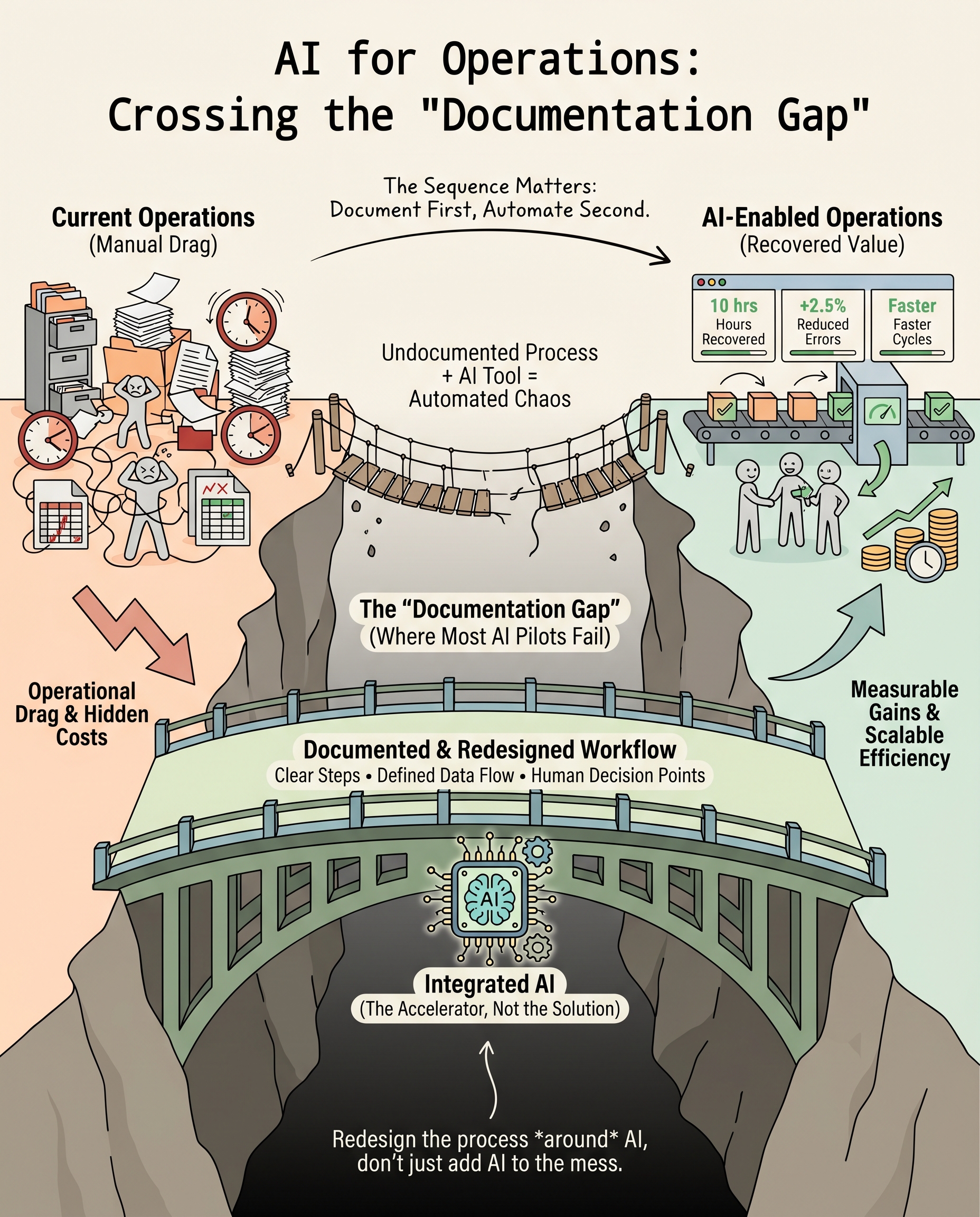
The businesses getting real returns from AI start with a different question than everyone else. Here's that question, the four moves that follow it, and how to run them this week.
Key takeaways
- Look at the work before you buy anything. AI pays off on a task you've written down. Pointed at a messy one, it speeds up the mess.
- The return shows up as hours. The most reliable gains are recovered team time, fewer errors and shorter cycle times.
- Measure before you switch anything on. Without a record of how the task runs today, you can't prove the AI made it better.
Taiichi Ohno, the engineer behind the Toyota Production System, had an odd way of training new managers. The story goes that he'd draw a chalk circle on the factory floor, put the manager inside it, and tell them to watch one stretch of the line for hours. No fixing. No suggestions. Just watching. A line often credited to him explains why: where there is no standard, there can be no improvement.
I think that circle is the best AI advice a small business owner can get. AI doesn't fix anything you haven't looked at. It runs it faster, problems included. So the first move in any AI project is the one Ohno taught: stand still and watch how the work really happens.
By the end of this guide, you'll know which process to look at first, how to measure it, and how to tell whether AI made it better.
Why do so many AI investments show no return?
How many companies actually get a return from their AI spend? Fewer than you'd hope. Shibumi's 2026 AI Fatigue research found that 95% of enterprises report no measurable return from AI, even as their spending keeps rising. Money keeps going in. Value isn't coming out.
The software usually does what it promises. The order is what goes wrong. Money goes into software first, and the work that software is meant to fix gets looked at last, if at all.
So if you've tried an AI assistant and wondered what you got for it, you're in the majority. And the 5% who do see gains aren't using fancier software. They started with the work itself.
Where does the drag in your operations actually live?
Small business friction is specific and tiring. Someone copies customer details from one system into another by hand. The status in a spreadsheet doesn't match the project management app, and neither matches the customer records. A support ticket waits three hours because the person who usually handles it is in a meeting.
Look at those three examples again. Each piece of work is quick on its own. The cost comes when work moves from one person or system to the next. I call this the handoff tax: the time and errors you pay whenever work changes hands.
Leaders feel it. NVIDIA's 2026 State of AI report found that the top goals people name for AI are operational efficiency (34%), employee productivity (33%) and new revenue streams (23%). In other words, leaders want AI to take friction out of daily operations. The gap between that goal and the result comes down to where they start.
The handoff tax is probably bigger than it feels. Take one manual process that eats 10 hours a week. Run it for 50 working weeks at a fully loaded cost of $75 an hour, and it adds up to $37,500 a year. Plenty of businesses have three to five workflows like that.
For your business, a number like that is the right first line of any AI conversation. A product demo isn't.
Three common approaches, and where each one stalls
Buying the AI add-on. The first move for many owners is to switch on the AI features inside software they already pay for. Nothing new to learn and no migration, so the pitch sounds good. In practice the gains are small. Those features are built for the average customer, not for how your team operates. They speed up single tasks and ignore the handoffs, which is where the tax gets paid.
Handing it to one person. The second move is to give the project to a junior hire or your most technical team member. Without a map of the hours, that person often builds something that demos well and gets dropped three months later. In my experience, this rarely fails on skill. It fails because the builder doesn't have the business context to aim at the right problem.
Running a pilot. The third move is a pilot: one platform, one use case, 90 days to prove a return. Pilots feel disciplined. But a 2026 survey on enterprise AI adoption found that 6 in 10 enterprises with AI failures can't say why they failed. That tells me nobody wrote down the starting point, so there was nothing to measure the AI against.
What does this mean for you? Don't start a pilot you can't measure.
The missing step behind all three
None of these approaches starts with the work written down. Without that, you have no way to know whether the AI improved anything.
It sounds obvious. It's rare in practice. Few businesses have written down how their costliest recurring tasks run: each step, who does it, where the data goes and where it gets stuck. That knowledge lives in people's heads and old email threads. Put AI on top of it, and it automates the confusion along with everything else.
Deloitte's 2026 State of AI in the Enterprise draws a clear line here. The companies getting the most value are redesigning how the work runs, with AI at the center. About 37% of those surveyed use AI at a surface level, with little change underneath. That surface-level group is where I'd expect most "no return" stories to come from.
The fix doesn't require buying anything. It takes a few honest hours of writing things down before your next purchase.
Also: How to build an AI strategy that actually maps to your business
What does good AI process improvement look like?
The businesses getting steady returns follow a sequence that looks almost boring next to how AI gets marketed. Four moves.
- Audit hours before you audit software. Ask one question: which recurring task eats the most team hours each week? Pick the hungriest one, even if it isn't the most complex or visible. KYP.ai's research on automation metrics lists staff time saved as among the clearest early signs of real return. So your audit starts there, not with vendor demos.
- Write down the steps before you automate them. Map each step, each handoff, each system the data touches and each point where a person makes a call. A 90-minute session with the people who do the work tells you more than a week of sales calls. If you can't write it down, you're not ready to automate it.
- Set your baseline before the AI goes live. Record what the process costs today in time and errors, and how long one cycle takes. Worklytics' ROI tracking framework points to three reliable measures: task completion time, error rates and output per employee. This takes about 30 minutes, and it's the step failed pilots tend to skip.
- Prove one task, then expand. After a first win, going wide is tempting. Hold off. One well-measured improvement builds the confidence and the data that make the next project faster. Larridin's 2026 AI ROI framework says the finance leaders who keep funding AI look for exactly this. They want a documented baseline, a clear productivity gain and a cost per outcome that improves over time.
Here's what moves 1 to 3 look like in practice. Say your Monday starts with a status round-up, done by hand:
- Read the client emails from the past week.
- Copy each update into the project management app.
- Update the status column in the spreadsheet.
- Update the client record in the CRM.
- Post a summary in the team chat.
Four handoffs, one person, most of a morning. Now the same round-up with an AI assistant connected to those systems:
- The assistant reads the emails, drafts the updates in the project app and the CRM, and flags anything that doesn't match.
- You check the flags and approve.
The tax is gone. You keep the one step that needs your judgment.
For your business, the order matters more than the platform. Follow the four moves and your first project gives you a result you can prove.
Which workflows pay back the most?
"Use AI where you have repetitive tasks" is true, but it doesn't help you choose. The gains small businesses report tend to cluster in four areas.
- Moving data between systems. Copying information between customer records, the project management app and billing is one of the biggest manual workloads in a service business. An AI agent that keeps those systems in sync and flags mismatches can often recover 4 to 8 hours a week for each person doing it.
- Sorting and answering support requests. AI can sort incoming tickets, rank them and draft replies from your own help docs before a person reviews them. The gain shows up as faster first replies and a lighter load on your support team.
- Building reports. Pulling a weekly report from several systems eats owner or analyst time. AI can combine those sources and flag problems, like a project over budget or a client who's gone quiet. That removes 3 to 5 hours a week of effort that rarely needs judgment.
- Drafting proposals. For a service business, a first draft means pulling client notes and applying your pricing. With AI, that can drop from about 90 minutes to about 10. The saving repeats on every deal in your pipeline.
McKinsey's State of AI survey names workflow redesign as a key factor that separates the companies capturing real value from the rest. For you, one task from this list, documented and measured, often recovers enough value to pay for the next one.
Also: How to build an AI-ready organization before the software goes live
How do you know if your AI investment is working?
This is where a lot of businesses go quiet. They buy the software, run the automation, and assume the value is there because nobody does the task by hand anymore. That assumption is often wrong.
Track three things against your baseline: how long it takes, how much it produces and how often it goes wrong. Without that before-and-after comparison, you're running on a feeling.
The math doesn't need to be fancy. Say an automation saves 12 hours a week across your team, at a fully loaded $60 an hour. Over 52 weeks, that's $37,440 of recovered time. If it cost $8,000 to set up, the case for the next one makes itself.
So what does this mean for you? By month three, your AI investment should produce a calculation like that one. If it can't, go back to the baseline.
Also: Why most AI projects fail for small businesses, and the 5 things the successful 5% do differently
Three things to do this week
- Name the process. Pick the recurring task that costs your team the most time. Be specific. "Admin work" is too broad. "Copying project updates from email into the project management app every Monday morning" is right.
- Watch it and time it. Sit with the person who does the work, Ohno style, and go through each step. Note every handoff and every decision. This record is your baseline, and it's worth more than any demo you'll see this quarter.
- Decide what "better" looks like. What would you need to see in 60 days to call this a success: fewer hours, fewer errors or faster cycles? Write the number down now. That number tells you whether the AI is working.
Ready to find the task that pays back fastest in your business?
Our complimentary AI Readiness Assessment maps your current operations against your growth goals and shows where AI will pay back fastest. You'll walk away with a dollar figure for your operational drag and a clear order for tackling it, before you commit to any platform.